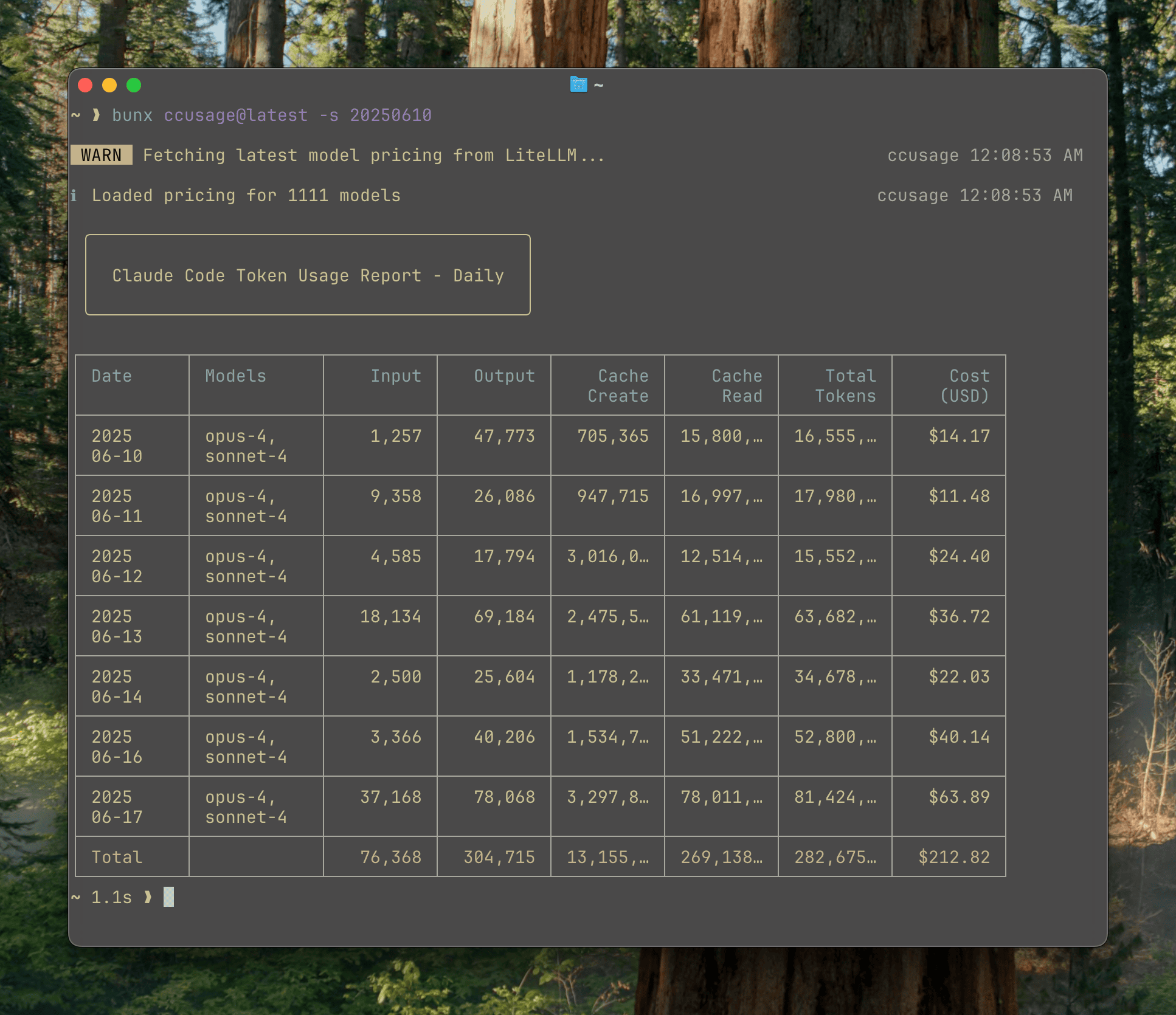
Analyze coding (agent) CLI token usage and costs from local data.
The main CLI tool for analyzing Claude Code, Codex, OpenCode, Amp, and pi-agent usage from local data. Track daily, weekly, monthly, and session-based usage with beautiful tables.
Thanks to ccusage's incredibly small bundle size (), you can run it directly without installation:
# Recommended
bunx ccusage

# Alternative package runners
pnpm dlx ccusage
pnpx ccusage
npx ccusage@latest
💡 Runtime:
bunx ccusageis recommended for everyday use. If you usenpx, include@latestand use Node.js 22.11+. Because the published CLI shebang targets Node.js, package runners can start ccusage under Node.js even when launched throughbunx. When ccusage findsbuninPATH, it automatically re-runs the bundled entrypoint with Bun for better warm runtime performance. SetCCUSAGE_BUN_AUTO_RUN=0to force Node.js.
# Basic usage
bunx ccusage          # Show all detected sources by day (default)
bunx ccusage daily    # All detected sources by day
bunx ccusage weekly   # All detected sources by week
bunx ccusage monthly  # All detected sources by month
bunx ccusage session  # All detected sources by session
bunx ccusage blocks   # Claude Code 5-hour billing windows
bunx ccusage statusline  # Claude Code status line for hooks (Beta)

# Source-focused reports and options
bunx ccusage claude daily --mode display
bunx ccusage codex daily --speed fast
bunx ccusage opencode weekly
bunx ccusage amp session
bunx ccusage pi daily --pi-path /path/to/sessions
bunx ccusage pi daily --pi-path /path/to/sessions,/archive/pi/sessions

# Explicit unified report
bunx ccusage daily --all

# Filters and options
bunx ccusage daily --since 2026-04-25 --until 2026-05-16
bunx ccusage daily --json  # JSON output
bunx ccusage daily --timezone UTC  # Use UTC timezone

# Project analysis
bunx ccusage claude daily --instances  # Group Claude Code by project/instance
bunx ccusage claude daily --project myproject  # Filter to specific Claude project
bunx ccusage claude daily --instances --project myproject --json  # Combined usage

# Compact mode for screenshots/sharing
bunx ccusage --compact  # Force compact table mode
bunx ccusage monthly --compact # Compact monthly report- 📊 Daily Report: View token usage and costs aggregated by date
- 📅 Monthly Report: View token usage and costs aggregated by month
- 💬 Session Report: View usage grouped by conversation sessions
- 🤖 Unified CLI Reports: View Claude Code, Codex, OpenCode, Amp, and pi-agent usage from one CLI
- ⏰ 5-Hour Blocks Report: Track usage within Claude's billing windows with active block monitoring
- 🚀 Statusline Integration: Compact usage display for Claude Code status bar hooks (Beta)
- 🤖 Model Tracking: See which models are used across supported sources
- 📊 Model Breakdown: View per-model cost breakdown with
--breakdownflag - 📅 Date Filtering: Filter reports by date range using
--sinceand--until - 📁 Custom Paths: Support for custom local data directory locations
- 🎨 Beautiful Output: Colorful table-formatted display with automatic responsive layout
- 📱 Smart Tables: Automatic compact mode for narrow terminals (< 100 characters) with essential columns
- 📸 Compact Mode: Use
--compactflag to force compact table layout, perfect for screenshots and sharing - 📋 Enhanced Model Display: Model names shown as bulleted lists for better readability
- 📄 JSON Output: Export data in structured JSON format with
--json - 💰 Cost Tracking: Shows costs in USD for each day/month/session
- 🔄 Cache Token Support: Tracks and displays cache creation and cache read tokens separately
- 🌐 Offline Mode: Use pre-cached pricing data without network connectivity with
--offline - 🏗️ Claude Instance Support: Group Claude Code usage by project with
--instancesand filter by specific projects - 🌍 Timezone Support: Configure timezone for date grouping with
--timezoneoption - ⚙️ Configuration Files: Set defaults with JSON configuration files, complete with IDE autocomplete and validation
- 🚀 Ultra-Small Bundle: Unlike other CLI tools, we pay extreme attention to bundle size - incredibly small even without minification!
Full documentation is available at ccusage.com
For contributors and developers working on ccusage, we provide a Nix flake-based development environment:
# Clone the repository
git clone https://github.com/ryoppippi/ccusage.git
cd ccusage

# Allow direnv (automatically loads Nix environment)
direnv allow

# Or manually enter the development shell
nix develop
This ensures consistent tooling versions across all contributors and CI systems. The development environment is defined in flake.nix and automatically activated via direnv when entering the project directory.
Check out ccusage: The Claude Code cost scorecard that went viral