Live Site: https://think-note-ai.vercel.app
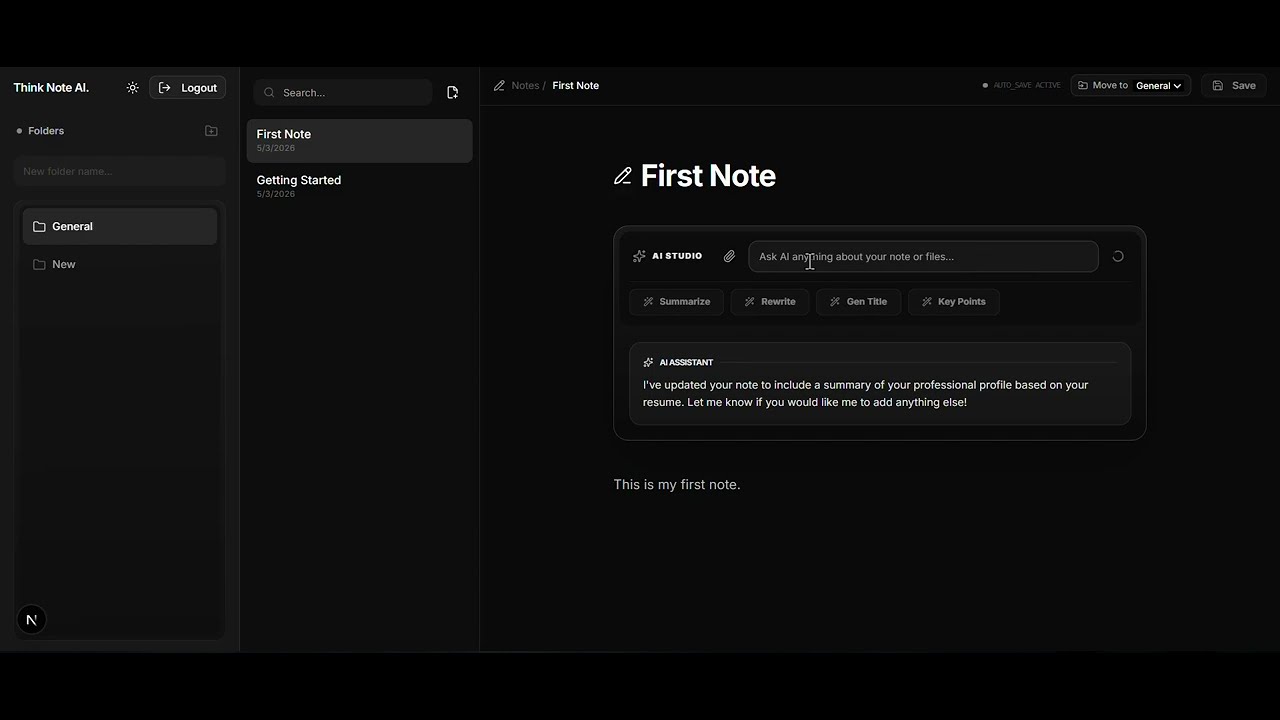
Think Note AI is a state-of-the-art, AI-powered note-taking application designed to transform how you organize, synthesize, and interact with your thoughts. Built with a premium aesthetic and powered by Google Gemini AI, it's more than just an editor—it's your second brain.
- 💬 AI Chat & Multimodal Analysis: Interactive AI chat interface with the ability to upload and analyze PDFs and Images for deeper insights.
- 🧠 AI Studio: Integrated AI commands to Summarize, Rewrite, Generate Titles, and Extract Key Insights from your notes using Google Gemini.
- 📁 Smart Organization: Nested folders and robust tag management system for managing thousands of notes effortlessly.
- ⚡ Real-time Workspace: A premium, distraction-free editor with real-time state management and debounced autosave.
- 🔐 Secure Authentication: OTP-based verification via email and JWT-secured sessions.
- 🛡️ Rate Limiting & Caching: Robust Redis-backed API throttling, caching for optimized performance, and maximum stability.
- 🔒 Advanced Security: Secured with Helmet to set HTTP headers, alongside robust validation.
- 📝 Comprehensive Logging: Centralized logging system powered by Winston and daily log rotation.
- 📱 Ultra Responsive: Fluid design that works perfectly on desktop, tablet, and mobile.
- 🔍 Global Search: Lightning-fast search across all your notes and folders.
- Framework: Next.js 16 (App Router)
- UI System: Shadcn UI + Radix UI
- State Management: Zustand
- Styling: Tailwind CSS 4.0
- Animations: Motion (Framer Motion)
- Icons: Lucide React
- Data Fetching: Axios
- Framework: NestJS
- Database: Serverless SQLite powered by Turso (via Prisma ORM)
- AI Integration: Google Generative AI (Gemini 1.5/2.0)
- Caching & Rate Limiting: Redis
- Authentication: JWT (JSON Web Tokens)
- Email/OTP: Brevo
- Security: Bcrypt Hashing & Helmet
- Logging: Winston
- Node.js (v20+)
- pnpm (Recommended)
- Google Gemini API Key
git clone https://github.com/Mostafiz002/Think-Note-Ai.git
cd Think-Note-Aicd Backend
pnpm installCreate a .env file in the Backend directory:
# No DATABASE_URL needed for default SQLite setup,
# but you can specify one if using a custom path.
PORT=
JWT_SECRET=
FRONTEND_URL=
GEMINI_MODEL=
GEMINI_API_KEY=
BREVO_API_KEY=
EMAIL_FROM=your_email@gmail.com
TURSO_DATABASE_URL=
TURSO_AUTH_TOKEN=
REDIS_URL=
Initialize the database:
npx prisma migrate dev
pnpm run devcd ../Frontend
pnpm installCreate a .env.local file in the Frontend directory:
BACKEND_URL="http://localhost:5000"Run the development server:
pnpm run devThis project is licensed under the MIT License - see the LICENSE file for details.
Mostafizur Rahman
- GitHub: @Mostafiz002
- Portfolio: mostafiz.dev